


Ever found yourself in the middle of a lecture, buried in a heap of scribbles and highlighter marks, feeling like you’re decoding ancient hieroglyphs rather than reviewing your notes? You’re not alone. In a world where every second counts, students are constantly searching for tools to catapult their studying efficiency to new heights. Allow us to lift the burden off your backpack with a digital solution on the best note-taking app for students
Here, we’ll help you find the best note-taking app for students which is designed to optimize your study sessions, transforming chaos into a symphony of organized bullet points, synced audio recordings, and colorful diagrams tailored for the academic hustlers. Get ready to revolutionize the way you capture knowledge, one tap at a time.
Let’s explore the top 5 note-taking apps for students that are making waves in the education industry:
1. GoodNotes: Overall Best Note-Taking App for Students

Key Features:
- Text Conversion: Transforms your handwritten notes to typed text, making them more accessible and shareable.
- Audio Recording: Record and playback audio to complement your written notes, perfect for reviewing lectures.
- PDF Annotation: Easily import and annotate PDFs, essential for reviewing and interacting with textbooks or assigned readings.
- Collaboration Tools: Share notes with peers, enabling group study and project coordination.
- Presentation Mode: Present notes in a clean, professional manner, ideal for group studies or formal presentations.
- Advanced Search: Quickly locate notes with a robust search feature, saving time when revising.
- Shape Recognition: Draw perfect geometric shapes with ease, enhancing diagram and chart creation.
- Customizable Templates: Offers various templates for planners, journals, or custom note pages, catering to personal preferences.
- Stickers and Study Aids: Enhance notes with digital stickers and create interactive study sets to simplify learning.
- Lasso Tool: Easily select, move, or resize objects and text within your notes.
- Favorite Tools: Keep frequently used tools like pens, highlighters, and erasers easily accessible.
- Cross-Device Syncing: Access notes across multiple devices, ensuring your work is always at hand.
Review:
GoodNotes stands out in the digital note-taking arena as a feature-rich and intuitive app that caters to the versatile needs of students. With the ability to switch from typing to handwriting, or from drawing to highlighting, it adapts to different learning styles and study habits.
The handwriting-to-text conversion is a game-changer for students who prefer the tactile feel of writing but need the practicality of digital text. Moreover, the ability to record lectures within the app and play them back alongside notes is an invaluable tool for comprehensive studying.
The collaborative features foster teamwork and simplify group projects, while the advanced search function ensures that no key point is ever lost in the shuffle. Additionally, its shape recognition and range of artistic tools make creating visually appealing and informative diagrams a breeze.
The cross-device syncing is a lifesaver for students on the go, who require seamless access to their materials across various platforms.
Students report that the customizable templates provide a sense of personalization and organization that traditional notebooks simply can’t match. The added flair of digital stickers and interactive study sets sparks creativity and engagement in what could otherwise be mundane study sessions.
All things considered, GoodNotes is more than just a note-taking app; it’s a comprehensive tool that not only aids in capturing and organizing information but also significantly enhances the learning experience.
Elevate Your Note-Taking Game with Our Free GoodNotes Templates
Unleash your full academic potential with our exclusive collection of Free GoodNotes Templates! Tailored to complement the dynamic features of GoodNotes, these templates are designed to streamline your note organization and boost your productivity. Whether you’re plotting out your next big project, scheduling your study sessions, or jotting down quick lecture notes, our templates cater to every aspect of student life.
2. Google Keep: Best Note-Taking App for Students in Google’s Ecosystem
Key Features:
- Quick Access Sidebar: Instantly view and manage notes within Gmail, Google Docs, or Google Calendar thanks to the convenient sidebar.
- Seamless Integration: One-click conversion of notes into Google Docs and reminders that sync with Google Calendar make for a smooth workflow.
- Cross-Platform Compatibility: Available on Android, iOS, web, and as a Chrome extension, ensuring your notes are always within reach.
- Transcription Service: Speak your thoughts out loud and have them transcribed automatically with the audio note feature of this free note-taking app.
- Zero Cost: Included with your Google account at no additional charge, making it a cost-effective solution for note-taking.
Review:
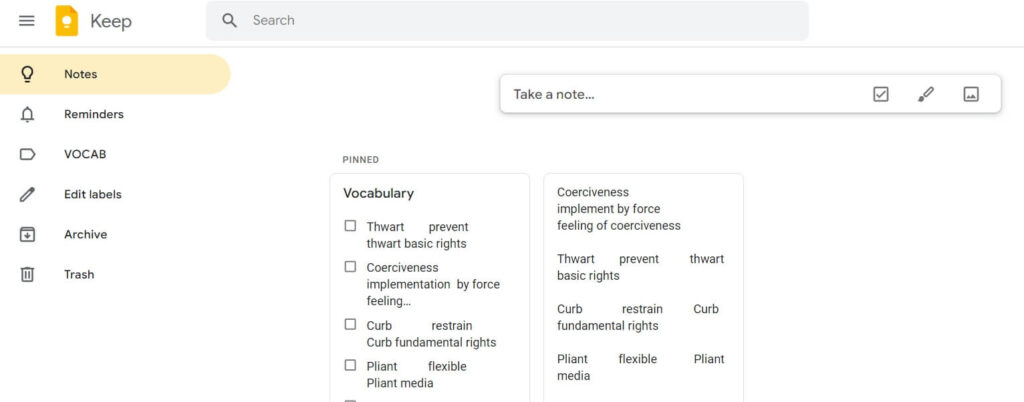
Google Keep stands out for its no-frills approach to note-taking, delivering what you need without complicating your workflow. For students deeply entrenched in the Google ecosystem, it is a boon that enhances multitasking and organization. Its quick-access sidebar is a game changer, eliminating the need to switch between apps when plowing through emails or documents.
Maybe you’re researching for a term paper and find useful information; with a simple click, that content can be saved to Keep via the Chrome extension and later expanded into a full document in Google Docs. Keep nails the basics of digital note-taking while flawlessly marrying itself to the suite of Google services, serving not just as a standalone app but as a nexus point for your academic activities.
The app’s most striking feature is perhaps its simplicity – it’s this very quality that may win over students searching for an uncomplicated way to capture fleeting thoughts or detailed research.
While free note-taking apps may lack elaborate formatting options found in more robust apps, Google Keep’s strength lies in rapid note capture and exceptionally smooth integration, proving that sometimes, simplicity indeed is the ultimate sophistication.
3. Notion: Best Collaborative Note-Taking App for Students

Key Features:
- Collaborative note-taking: Notion allows multiple users to work on the same document simultaneously, making it ideal for team projects and group studies.
- Flexible page & block system: Users can mix various blocks within pages, including text, images, to-do lists, and more, to customize notes according to their needs.
- Integrated task and project management tools: Apart from note-taking, Notion helps keep track of tasks and deadlines, functioning as a comprehensive project management suite.
- AI-Assisted functionalities: With AI features, Notion can summarize content, identify action items, and utilize a Q&A chatbot to help users navigate their notes.
- Broad app integration: Through Zapier, Notion connects with a plethora of other apps, streamlining workflows and ensuring seamless information transfer.
- Templates for quick setup: Notion provides pre-built templates so you can jumpstart your note-taking process or project management without starting from scratch.
Review:
Notion is undeniably a powerhouse among the best note-taking apps available for team collaboration and individual use. Foremost, the app shines with its versatile block system that supports the creation of customized and intricate note layouts. Users can include all sorts of multimedia elements, from engaging video clips for visual learners to voice notes perfect for auditory review sessions.
The embedded task management capabilities make it a favorite for those who want to transition seamlessly from meeting notes to actionable items, without the hassle of switching between different Google apps. Moreover, the AI elements of Notion aren’t just for show; they are practical tools that enhance the productivity of users, particularly for Apple users and others who manage large volumes of information. It’s a good note-taking app that transcends beyond just notes—it can transform into an information hub for everything work and study-related.
For those concerned with the flow of work across different platforms, Notion’s integration with Zapier and its availability as a free version provides an appealing solution. In an educational setting, students can utilize Notion’s free note-taking capability while also being able to delve into more advanced features as needed. Although the offline functionality might not measure up to other note-taking apps like Apple Notes, for those who primarily work online, Notion offers a robust platform that encourages productivity and collaboration.
Given the breadth of features, Notion might potentially intimidate the single user looking for simplicity. However, its value proposition lies in the high level of customization and advanced features that few other apps can rival. Whether it’s for managing complex projects or compiling comprehensive study guides, Notion stands out as a versatile and powerful application for anyone serious about elevating their note-taking game.
4. Microsoft OneNote: Best Cross-Platform Note-Taking App for Students

Key Features:
- Freeform Note-Taking Canvas: Allows users to organize their work just like a physical binder with sections and pages but with the flexibility to place notes anywhere on the page.
- Integrates with Microsoft Office: Syncs easily with other Microsoft apps, ensuring students can manage all their notes and documents in one suite.
- Audio Note Capability: Enables students to record lectures and meetings directly into their notes for easy playback.
- Customizable OneNote Templates: Offers a variety of templates to quickly create structured notes for different needs and subjects.
- Advanced Math Assistant: Aids students in solving complex math problems with step-by-step guidance (requires a subscription).
- Zapier Integration for Automation: Connects with other applications via Zapier to streamline workflows and note management across platforms.
Review:
OneNote from Microsoft spectacularly addresses the needs of students by offering an intelligent and flexible platform for organizing digital notes. The app creates a dynamic note-taking space suitable for various academic demands, from scribbling quick ideas during a brainstorming session to in-depth lecture notes enriched with annotations and diagrams. What makes OneNote stand out is its virtually unlimited canvas where the organization is not confined but inspired by the creativity and unique requirements of the user—a dream come true for visually driven learners and multitaskers.
Seamless integration with other Google Apps is not its strongest suit, but if you’re already entrenched in a Microsoft-driven environment, OneNote could be a treasure trove. The lack of major integrations is a trade-off for its robust collaboration with the office suite and synchronization across all your devices, making sure that all the notes, rich text documents, audio files, and digital notes are accessible whenever and wherever needed.
The Math Assistant feature is a boon for students grappling with complex algebra or calculus, providing a solid companion for STEM subjects. With saving quick notes, scanning documents, and tucking away valuable web pages, OneNote promises that no nugget of information slips through the cracks. While the free version is generally sufficient for most users, active students who rely heavily on multimedia notes may find the extra storage from paid versions to be a worthwhile investment.
5. RemNote: A Dynamic Note-Taking App for Students

Key Features:
- Linked Notes: Create a web of knowledge with linked notes that mirror your thought processes.
- Multiple Panes: Open and view several notes simultaneously to streamline studying.
- Integrated Flashcards: Easily convert notes into flashcards for efficient study sessions.
- Active Recall Practice: Utilize the flashcard system to reinforce memory through repeated self-testing.
- Intelligent Spacing: The app smartly schedules review times based on your self-rated understanding of flashcard topics.
- Robust Search Functionality: Quickly locate important notes, past lectures, or connected ideas.
- Sync Across Devices: Your recent notes are accessible on any device, ensuring your information is always at your fingertips.
- Document Scanning: Use the app to scan documents and include them in your notes effortlessly.
Review:
RemNote has proved to be a formidable player among note-taking applications, especially suited for the rigorous demands of academic study. Its ability to connect notes in a hierarchical structure makes it easier than ever to organize thoughts and study materials meaningfully. When it comes to multitasking, the multi-pane feature is a lifesaver; it offers the luxury of quickly referencing other topics without losing focus on current notes.
Moreover, RemNote addresses the common struggle of transferring and remembering knowledge through its seamless integration of flashcards. This is particularly useful for subjects that require memorization, such as biology or language vocabulary. Their intelligent spacing algorithm is akin to having a personal tutor, prompting review at optimized intervals to help fortify memory retention.
The search functionality has proven robust, managing to sift through unlimited notes to find exactly what’s needed without a hitch. As a student often on the move, I appreciate the sync feature, making my audio notes, text notes, recorded voice memos, and scanned documents available across all devices – from laptops to mobile apps.
In terms of accessibility, RemNote’s free plan is extremely capable, though the premium version unlocks even more powerful tools. Personal use, however, doesn’t necessarily warrant the additional expenditure, as the free app handles most note-taking needs with finesse. Adding to its strength are features like export notes and end-to-end encryption, which means you can keep your ideas safe and share them in different formats.
To sum it up, RemNote stands out as an essential tool for anyone looking to rein in the chaos of studying and replace it with a structured, efficient system for acquiring and retaining knowledge. Whether it’s for personal life organization or gearing up for a team project, RemNote is dazzling in its versatility and ease of use.
Top Considerations When Choosing a Note-Taking App for Students

When it comes to choosing the best note-taking app for students, there are a few key considerations to keep in mind. These include:
Syncing Across Multiple Platforms:
To keep your notes up-to-date, whether you’re on your laptop or mobile device, the app needs to offer robust sync capabilities. An example is Microsoft OneNote, which syncs effortlessly across Windows, Mac, iOS, and Android versions.
Rich Media Options:
For those who prefer to enrich their textual notes with visuals or audio, apps like Bear Notes allow the integration of images and the ability to record voice memos, thus accommodating various learning styles.
Comprehensive Search:
The power to quickly sift through your notes can be a game-changer, especially during exam time. Note-taking software with robust search capabilities, such as Evernote’s Web Clipper feature, can turn hours of flipping through notes into a swift retrieval process.
User-Friendly Interface:
The intuitive design of apps like iCloud Notes ensures you can take notes quickly without the frustration of a steep learning curve, making for a more efficient study session.
Advanced Organizational Tools:
From tagging to creating separate notebooks, organizational tools are critical. Apps with these features help keep all your study material on the same page, figuratively speaking.
Integration with Popular Services:
Increase your productivity by using a notes app that integrates well with other web apps and services. For instance, a handy Chrome extension could save images and text directly from your browser into your note-taking application.
Collaborative Options for Team Use:
For group projects or study sessions, collaboration features like shared notes and simultaneous editing—as seen in Google Keep—are invaluable.
Security Measures:
To protect your notes, especially those containing personal or academic information, security features like two-factor authentication should be non-negotiable.
Cost Effectiveness:
Whether you choose a completely free version or a paid account, it should align with the value it provides. Some apps offer a limited free version with essential functions and a paid version for full access to advanced features.
Best Note-Taking App for Students: The Bottom Line
In conclusion, the perfect note-taking app for you depends on your specific needs as a student. Whether you prioritize collaboration, seamless integration with other platforms, or robust organizational features, there’s an app that caters to your learning style. While all these apps have their unique advantages, we invite you to start your note-taking journey with GoodNotes. Enhance your study sessions with our carefully designed Free GoodNotes Templates, available at no cost to help you get organized and make the most of your digital note-taking experience. Embrace the power of advanced technological tools and let them assist you in achieving academic success.
Best Note-Taking App for Students: Frequently Asked Questions
What app do students use to take notes?
Students use a variety of apps to take notes depending on their individual needs and preferences. Popular options include GoodNotes for its handwriting recognition and templates, Google Keep for its integration with Google services, Notion for collaborative work, Microsoft OneNote for its Office integration, and RemNote for its flashcards and spaced repetition features.
Which note-taking method is best for students?
The best note-taking method varies from one student to another. Many students find success with the Cornell method for its structured approach to organizing notes. Others prefer the outlining method for creating a hierarchy of information or the mapping method to visually connect ideas. Using apps like GoodNotes, OneNote, or Notion allows for these methods to be applied digitally.
What app do college students use to take notes on an iPad?
College students often choose GoodNotes or Notion for note-taking on iPads due to their smooth handwriting experience, ability to annotate PDFs, and range of features tailored for stylus use. Other students also opt for Microsoft OneNote for its cross-platform capabilities and extensive Office integration.
Which app is best for note-making?
The best app for making notes depends on the user’s specific requirements. GoodNotes is favored for handwritten notes; Notion and OneNote for typed notes with complex organization; Google Keep for quick and easy syncing with Google services; and RemNote for those who wish to combine note-taking with study aids like flashcards.
What note-taking app works with a stylus?
Many note-taking apps work well with a stylus. GoodNotes provides excellent stylus support, especially on iPad. Microsoft OneNote is also stylus-friendly across different devices, including Windows tablets and Surface devices.
What is the best app for pen notes on an iPad?
For pen notes on iPad, we recommend GoodNotes due to its stylus support, including palm rejection, pressure sensitivity, and a natural writing feel. These apps also offer a wide range of paper styles and templates, making them ideal for handwritten notes on the iPad.